
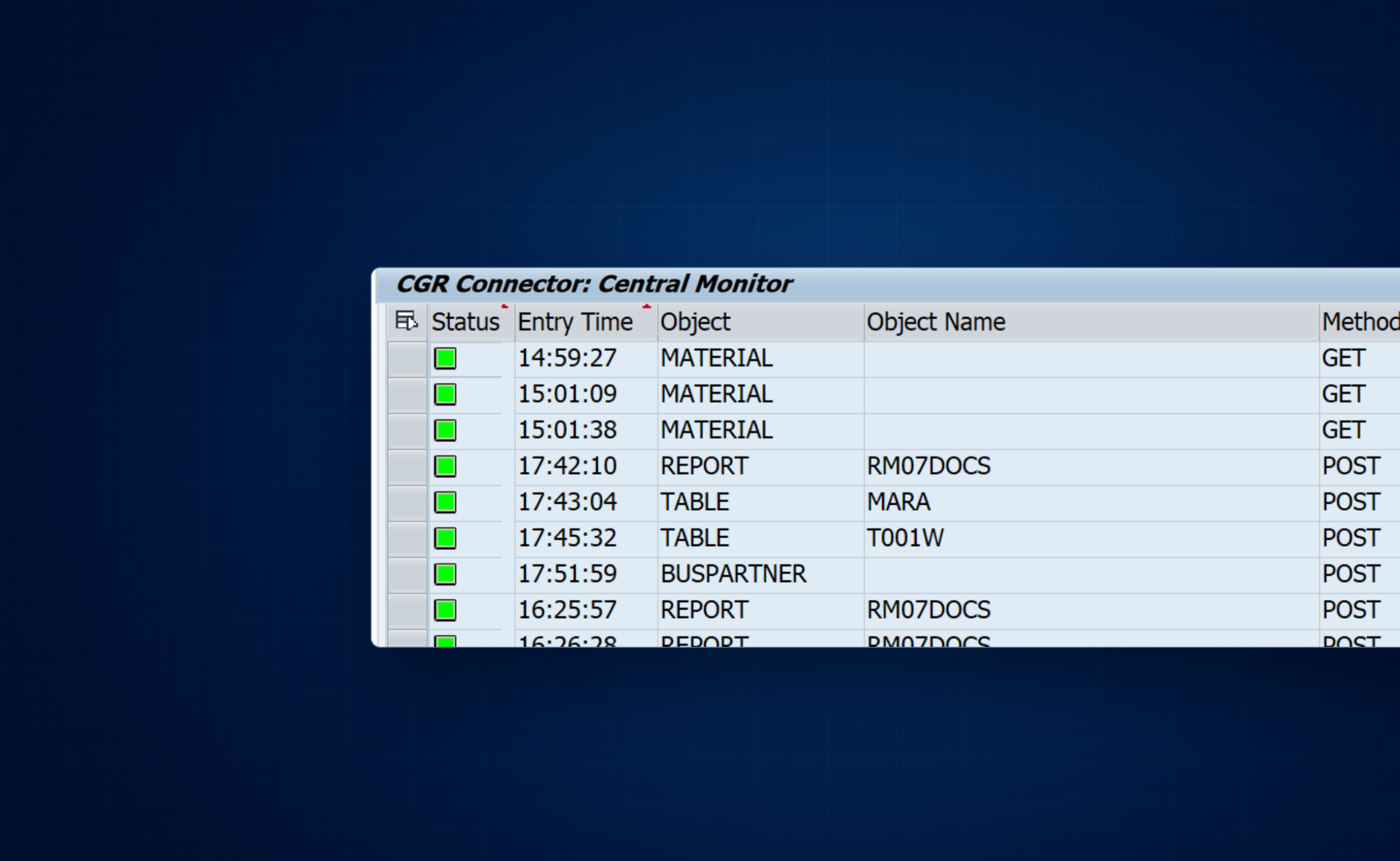
Release 2.0
General
CGR Connector 2.0 exposes authorized SAP tables, database views, function modules, BAPIs and ALV-compatible reports through JSON APIs. This release adds typed input validation, object metadata, detailed attempt history, guarded manual function reruns, business-result classification and optional email notifications.
Supported SAP systems
- On premises: SAP systems from SAP NetWeaver 7.4 onward, including on-premises SAP S/4HANA.
- Private cloud: SAP systems where the required ABAP objects and installation privileges are available.
- Public cloud: unsupported because its restrictions prevent use of the required SAP objects.
Basis must check the supplied package prerequisites against the exact installed SAP components and releases before installation or upgrade. The delivery notes identify the package appropriate to that system.
Release 2.0 and the two interfaces
1.3 and 2.0 are connector releases. SICF and OData are alternative HTTP interfaces. Choose the interface installed in your landscape; its URL, authentication and POST format apply throughout your integration.
Direct REST service
Base path /cgr/api. Uses HTTP Basic authentication over HTTPS. Results are returned directly as JSON. A configured backend RFC destination is supported.
SAP Gateway service
Service /CGR/CONN_SRV. Supports OAuth 2.0 flows available in your SAP system. GET streams return JSON directly; a function POST returns an OData entity containing the serialized result.
What is new in 2.0
- Typed function calls: bind scalar, structure and table inputs against the active SAP function interface, including CHANGING and TABLES parameters.
- Read-only metadata: inspect authorized function parameters, table fields and report variants before constructing a request.
- Validated reads: validate table projection, filters, sorting and paging; validate report variants and produce escaped JSON output.
- Operational visibility: page through request headers, inspect stored input/output, identify the caller and follow immutable attempt history.
- Controlled operations: retain and purge logs by policy, explicitly rerun a completed function with original or corrected input, and separately classify its business result.
- Optional notifications: capture rule-matched events and deliver individual emails or bounded digests through SAPconnect after explicit configuration.
Table access is read-only. Function modules, BAPIs and reports can have their own business effects; authorize and test the specific objects exposed to each integration.
Installation and upgrade
Obtain the CGR Connector 2.0 delivery and its target-system instructions. Basis installs the package; licensing, object configuration and access grants are then maintained in each application client.
Install the add-on and activate SICF
- Basis verifies the SAP component prerequisites, SPAM/SAINT level, backup and change window. Agree the application client, HTTPS address and integration user.
- Log on to client
000and startSAINT. Load the supplied installation package from the front end or application server. For an existing installation, use the matching upgrade delivery. - Review the calculated queue and prerequisite checks, complete the import and confirm completion. Verify component
CGRrelease200, or the exact release specified in the delivery notes. - In
SICF, activatedefault_host > cgr > apiand required parent nodes. Verify handler/CGR/CL_API_HANDLER. - Configure the license, object catalog and user grants in the application client before testing the API.
The /func, /table and /report paths are routed beneath /cgr/api; they are not separate SICF services.
SICF with a separate backend
Install the required connector components in the HTTP-facing system and execution backend. Basis configures and tests the backend RFC destination and maintains its default BACKEND entry in /CGR/RFC_DEST. If multiple backends are used, validate the approved system aliases and their destinations.
The inbound HTTPS call terminates at the HTTP-facing system; the selected object executes in the configured SAP backend through RFC. Verify the actual backend system, client and execution user, along with its license and access grants.
Register the OData service
- Import the supplied OData delivery according to its installation notes.
- Open
/IWFND/MAINT_SERVICEin Gateway, choose Add Service and select the intended local or backend system alias. - Find technical service
/CGR/CONN_SRV, add it with the appropriate package and transport assignment, and activate the corresponding ICF service. - Verify
/sap/opu/odata/CGR/CONN_SRV/and its service metadata using an authorized identity. - Configure the OAuth client, supported grant and service scope with your SAP security administrator.
The OData option does not require a separate connector-configured backend RFC destination. Use Gateway’s configured service/backend selection; do not apply SICF routing instructions to it.
Verify the first request
After granting the integration user TABLE / MARA, perform a small read in the intended application client:
GET /cgr/api/table?id=MARA&select=MATNR&top=1&sap-client=100 HTTP/1.1
Host: sap.example.com
Accept: application/json
Authorization: Basic <credential supplied by your HTTP client>
Replace the host, client and credentials with your own values. Expect HTTP 200 and at most one row; [] is valid when no rows match. Copy X-CGR-Message-ID, locate that request in /CGR/MONI and verify the recorded execution identity. Also test denial for a known object without an exact or wildcard grant.
Configuration
Configure the license, generic object types, routing and named-user grants in the same application client that receives the API calls.
Install the license file
- Obtain the complete licensing system identifier from Basis:
SLIC_GET_SYSTEM_ID, outputSYSTEMID. This value may differ from the ordinary three-character SAP SID. - Request a CGR license text file for that system and product
SAP_CONNECTOR. - In the application client, open
/CGR/LICENSE. EnterSAP_CONNECTORin Product and select the original CGR-issued.txtfile in License File using F4. - Choose Execute (F8). Confirm the installed/replaced success message, product, system identifier and validity date.
Use the complete original file containing its CGR1: key. License records are client-dependent; install the license in every application client that uses the connector. Uploading a replacement updates that product’s license in the current client.
Configure generic object types
In /CGR/BO, create or verify these entries and save:
| API BO | Description | POST Input Structure |
|---|---|---|
FUNCTION | Generic Function API | Leave blank |
REPORT | Generic ALV Report API | /CGR/ST_REPORT_INP |
TABLE | Generic Table API | /CGR/ST_TABLE_INP |
Leave POST Output, PUT Input, PUT Output and GET Output Structure blank for these generic entries. This catalog describes the interfaces; access is granted separately in /CGR/API_AUTH.
Choose the execution backend
For a same-system SICF installation, keep local routing. For a remote SICF backend, maintain the default destination in /CGR/RFC_DEST. An approved sap-system alias can select another configured backend. Basis must verify each destination and the actual execution user rather than assuming the inbound and backend identities are identical.
The OData interface uses Gateway’s service/backend configuration. It does not require the SICF default-destination setup.
Grant access to named users and objects
Maintain /CGR/API_AUTH using uppercase SAP usernames and object names. The user must match exactly. Prefer a separate exact grant for each required table, function or report:
| User | API BO | Object Name | Meaning |
|---|---|---|---|
CGR_API | TABLE | MARA | Read this table |
CGR_API | FUNCTION | BAPI_PO_GETDETAIL1 | Call this function |
CGR_API | REPORT | RM07DOCS | Run this report, subject to its prerequisites |
CGR_API is an example username. A full * in Object Name grants every object of the specified type. A full * in both API BO and Object Name grants every supported type and object for that exact user.
BAPI_* or MA*, a wildcard username, and * API BO with a specific Object Name are unsupported. There are no deny overrides: removing a narrow grant does not revoke access if a broader wildcard remains.No matching grant means denial. The allowlist does not grant SAP transaction access or replace the standard permissions required by the selected interface and business operation. Test changed permissions in a fresh authenticated session.
Security and authentication
Authenticate the integration identity, grant the required connector objects and assign the corresponding SAP roles. A successful login or bearer token alone does not authorize every SAP object.
Security baseline
- Use HTTPS with a trusted certificate and a dedicated SAP integration identity.
- Grant exact objects in
/CGR/API_AUTHand the minimum SAP permissions needed for them. - Store credentials outside application source and request URLs. Treat retained payloads as potentially sensitive business data.
- Limit monitor, rerun, cleanup, classification and notification-administration privileges independently.
- Review retention settings and notification recipient lists for the data exposed by the integration.
Network behavior
Backend RFC remains supported for the SICF option. The OData option does not require a separate connector-configured backend RFC connection. Optional email notifications use the SAPconnect/SMTP infrastructure configured by Basis; that is separate from HTTP/HTTPS connectivity and requires an approved mail route.
SICF: HTTP Basic
The SICF interface supports HTTP Basic authentication only. Configure your HTTP client with the SAP username and password, use HTTPS and select the intended SAP client. Avoid putting credentials in URLs or copied diagnostic material.
OData: OAuth 2.0
The OData interface supports any OAuth 2.0 flow supported by your SAP system. The available grants, client setup and scopes depend on that system. In Gateway, register /CGR/CONN_SRV, enable its OAuth scope and configure the client and grant with your SAP security administrator.
For a Client Credentials deployment, the integration requests a token from the configured SAP token endpoint. This is an example; use the actual client ID, secret and service scope assigned in your system:
POST /sap/bc/sec/oauth2/token HTTP/1.1
Host: sap-gateway.example.com
Authorization: Basic <base64(client_id:client_secret)>
Content-Type: application/x-www-form-urlencoded

grant_type=client_credentials&scope=%2FCGR%2FCONN_SRV_0001
Use the returned access token on API requests:
Authorization: Bearer <access_token>
Accept: application/json
OAuth scope and SAP roles
Maintain the client and service scope through the security tools available in your SAP release, such as SOAUTH2. Where required, the assigned PFCG role includes S_SCOPE with OA2_CLIENT set to the actual client ID and OA2_SCOPE set to the service-generated scope.
The resulting SAP identity still needs its connector object grants and the business-operation permissions. For Gateway POST requests, also honor the service’s CSRF-token and session requirements.
Calling APIs
Choose SICF or SAP Gateway OData, send correctly typed input and inspect both the technical response and any business messages returned by the SAP object.
Methods, formats and controls
| Operation | SICF | SAP Gateway OData |
|---|---|---|
| Function execution | GET /cgr/api/func or POST /cgr/api/func | GET /func('1')/$value or POST /func beneath the service root |
| Table/view read | GET or POST /cgr/api/table | GET /table('1')/$value |
| Report execution | GET or POST /cgr/api/report | GET /report('1')/$value |
| Object metadata | GET on the object route with cgr-metadata=true | GET on the matching /$value route with cgr-metadata=true |
| Function POST input | Array of NAME/VALUE entries | Object mapping function parameter names to values |
| Function POST output | Native JSON result | OData entity; parse its d.CONTENT string as JSON |
The OData service root is /sap/opu/odata/CGR/CONN_SRV. Gateway TABLE/REPORT POST is not supported by this 2.0 interface. A POST to the table endpoint is still a read request; it is not a table-write API.
Supply the object name in id. Use the connector’s select, filter, orderby, top and skip controls as shown; they are not interchangeable with every standard OData query option. URL-encode query values. Query controls must occur only once.
Use UTF-8 JSON for request bodies. Gateway also accepts supported, explicitly identified or BOM-marked UTF-16 input; malformed or unsupported byte sequences are rejected. Match the documented body format for the selected interface.
Paging and size limits
There is no fixed total table-row limit across pages. Use a positive top and a nonnegative skip to choose a manageable page, and a deterministic orderby that includes unique keys where possible. Concurrent changes can affect offset paging; pages are not a database snapshot.
top=0 retains the unlimited-results convention; it is not a safety cap. Both paging values must fit the supported integer range. For table reads, positive top bounds the database fetch by skip + top. A report can still need to execute and generate its output before the result page is returned.
SAP memory/string capacity, timeouts, proxies and clients can impose additional limits. The monitor display, corrected-input editor and business classifier have separate smaller bounds described below; these do not define a universal API row limit.
SICF API
Use HTTP Basic over HTTPS. A successful SICF request returns the native result JSON directly. The examples use placeholders and assume the caller has the required grants.
SICF: read a table or view
GET /cgr/api/table?id=T001W&select=WERKS,NAME1,LAND1&LAND1=DE&orderby=WERKS&top=50&skip=0&sap-client=100Additional field-name query parameters are equality filters. In this example LAND1=DE restricts the rows. Use filter for a compound expression; URL-encode its spaces and reserved characters when sending it.
GET /cgr/api/table?id=MARA&select=MATNR,MTART&filter=(MTART eq 'FERT' or MTART eq 'HALB')&orderby=MATNR&top=100&skip=0A POST can express a read with a validated input document:
POST /cgr/api/table?id=T001W&orderby=WERKS HTTP/1.1
Content-Type: application/json

{
  "SELECT": "WERKS,NAME1,LAND1",
  "SKIP": "0",
  "TOP": "50",
  "PARAMETERS": [
    { "FIELD_NAME": "LAND1", "OPERATOR": "EQ", "VALUE": "DE" }
  ]
}
Table validation, filters and ordering
All projected, filtered and ordered field names are validated against the active table/view definition. Unknown fields, duplicate selections/order fields, incompatible input shapes and unsupported query syntax fail instead of becoming arbitrary SQL.
| Input | Supported form |
|---|---|
select / SELECT | Comma-separated field names |
orderby | Validated field names with optional ASC/ASCENDING or DESC/DESCENDING; comma-separated or legacy whitespace-separated |
filter | eq ne gt ge lt le, and or not, parentheses, startswith and contains, with quoted or numeric literals |
POST PARAMETERS | EQ NE GT GE LT LE, their comparison symbols, a validated IN list and LIKE with one scalar pattern |
Raw SQL, subqueries, field-to-field comparisons and unsupported literal prefixes are rejected. startswith and contains treat wildcard characters in their argument as literal text. Use the LIKE parameter operator when a SQL-style pattern is intended. This interface exposes DDIC tables/database views; modern CDS view-entity discovery is not included.
SICF: call a function or BAPI
For scalar inputs, use GET:
GET /cgr/api/func?id=BAPI_PO_GETDETAIL1&PURCHASEORDER=3000000010&sap-client=100For structures and internal tables, use POST with a NAME/VALUE array:
POST /cgr/api/func?id=BAPISDORDER_GETDETAILEDLIST HTTP/1.1
Content-Type: application/json

[
  { "NAME": "I_BAPI_VIEW", "VALUE": { "HEADER": "X", "ITEM": "X" } },
  { "NAME": "SALES_DOCUMENTS", "VALUE": [
      { "VBELN": "0000004980" },
      { "VBELN": "0000004981" }
  ] }
]
Parameter and field names must match the active SAP interface. The example document numbers are placeholders; verify object metadata and authorizations before calling the function in your system.
Typed parameters and transaction behavior
2.0 binds supplied input to the active function’s ABAP types. IMPORTING parameters receive input, EXPORTING parameters contribute output, and CHANGING/TABLES parameters can receive input and return their changed values. Use JSON objects for structures and arrays for internal tables. Preserve leading-zero identifiers as strings and supply date, time, decimal and flag values appropriate to their SAP types.
Unknown or duplicate parameters, output-only input parameters, incompatible shapes and invalid typed values are rejected before dispatch. Omitted parameters retain the connector’s existing omitted/default-binding behavior; omission does not mean JSON null.
The native function result is an array of named output values, for example this shortened illustrative result:
[
  { "NAME": "ADDRESS", "VALUE": { "FIRSTNAME": "Example" } },
  { "NAME": "RETURN", "VALUE": [] }
]
Set commit=X only when the function’s contract requires an explicit connector-owned commit. The connector serializes successful output before its explicit function commit and rolls back catchable execution/serialization failures. Commits inside the called function and external effects cannot be undone by that guarantee. A successful HTTP response can still contain BAPI business-error messages.
SICF: execute an ALV report or SAP Query
GET /cgr/api/report?id=RM07DOCS&variant=VAR1&top=100&skip=0&sap-client=100The report or generated SAP Query program must exist and produce compatible tabular output. Create the intended selection variant in SAP and verify its business behavior before exposing it.
SICF also accepts a report POST body:
POST /cgr/api/report?id=RM07DOCS HTTP/1.1
Content-Type: application/json

{ "VARIANT_NAME": "VAR1", "SKIP": "0", "TOP": "100" }
Variants are checked against the active executable report and current client. Supported SAP&*/CUS&* system variants may also be resolved in client 000. Empty/non-tabular output becomes []; ambiguous duplicate normalized column headings fail explicitly. Result paging does not make the report’s own execution cost proportional to the page size.
SAP Gateway OData API
Use the registered service root, a bearer token and Accept: application/json. GET /$value requests return the raw result JSON. The literal key ('1') is part of the route; supply the actual SAP object name in id.
OData: table and report reads
GET /sap/opu/odata/CGR/CONN_SRV/table('1')/$value?id=T001W&select=WERKS,NAME1,LAND1&LAND1=DE&orderby=WERKS&top=50&skip=0
Authorization: Bearer <access_token>
Accept: application/json
The same validated table field, filter, ordering and paging rules apply. Use the unprefixed connector controls shown in the example.
GET /sap/opu/odata/CGR/CONN_SRV/report('1')/$value?id=RM07DOCS&variant=VAR1&top=100&skip=0A valid existing report variant is required for Gateway report execution. TABLE and REPORT are GET-only on this Gateway interface; SICF POST examples do not apply to it.
OData: scalar function GET
GET /sap/opu/odata/CGR/CONN_SRV/func('1')/$value?id=BAPI_USER_GET_DETAIL&USERNAME=API_TESTUSER
Authorization: Bearer <access_token>
Accept: application/json
Additional query parameters supply scalar function inputs. Parse the returned /$value body once as the native function-result array. Choose GET for read-only use; the called SAP function determines whether it has business effects.
OData: function POST
OData POST uses an object whose properties are the function inputs, rather than the SICF array:
POST /sap/opu/odata/CGR/CONN_SRV/func?id=BAPI_USER_GET_DETAIL HTTP/1.1
Authorization: Bearer <access_token>
Content-Type: application/json
Accept: application/json

{ "USERNAME": "API_TESTUSER", "CACHE_RESULTS": "X" }
Structures and tables appear as nested objects and arrays under their parameter names. The typed binding and commit rules are the same as for SICF. A successful Gateway function POST normally returns HTTP 201 with its entity wrapper; the connector’s recorded technical execution status is 200.
Parse a function POST result
The OData entity stores the native function JSON in the string d.CONTENT. Parse both layers. A shortened illustrative response is:
{
  "d": {
    "ID": "1",
    "MIMETYPE": "application/json",
    "CONTENT": "[{\"NAME\":\"ADDRESS\",\"VALUE\":{\"FIRSTNAME\":\"Example\"}}]"
  }
}
const entity = JSON.parse(httpResponseBody);
const functionResult = JSON.parse(entity.d.CONTENT);
const address = functionResult.find(parameter => parameter.NAME === "ADDRESS")?.VALUE;Inspect returned business messages as well as HTTP status. Classification can make those messages visible operationally, but does not change the API result or roll back a business operation.
Object metadata
Use read-only metadata requests to discover the current authorized object’s interface before constructing an execution request. Metadata neither reads business rows nor runs the selected function or report.
Request metadata
GET /cgr/api/func?id=BAPI_PO_GETDETAIL1&cgr-metadata=true
GET /cgr/api/table?id=T001W&cgr-metadata=true
GET /cgr/api/report?id=RM07DOCS&cgr-metadata=true
For Gateway, use the corresponding media-stream route:
GET /sap/opu/odata/CGR/CONN_SRV/func('1')/$value?id=BAPI_PO_GETDETAIL1&cgr-metadata=truecgr-metadata must occur once with exact lowercase true or false. It is a GET-only control; omit it from POST requests. false on GET selects normal execution.
What metadata contains
- Functions: parameter directions and references to the scalar, structure and table type definitions needed to construct input and interpret output.
- Tables/views: active field definitions, keys and available Dictionary details such as types, lengths, decimals and descriptions.
- Reports: the available report-variant catalog.
Metadata resolves in the same selected backend and remains subject to licensing and connector object authorization. A metadata type description does not promise that every ABAP type is usable as execution input. Metadata requests are marked separately in the log and do not retain execution payload bodies.
Monitoring and stored payloads
Use /CGR/MONI to correlate the external request with the execution identity, technical state, saved input/output and any subsequent manual attempts.
Find a request
Filter by the available request criteria, then use Older/Newer to navigate 100-header pages. Refresh and Criteria start again at the newest matching page. Sorting, filtering and export in the ALV grid apply to the current page, not the entire log repository.
Match the returned X-CGR-Message-ID where present. Request details include the object and interface, original request and execution identities, target system/client, technical execution state and correlation information. New records expose Caller IP as the observed connection peer; a proxy can be that peer, so it is not independently verified end-user identity. Add the column through Change Layout if a saved layout hides it.
A separate X-CGR-Log-Warning response header indicates a logging/finalization issue. Preserve it and the message ID. A missing record or uncertain log finalization does not prove the business call did not run.
Inspect input and output
Versioned logs separate execution context (C), original request bytes when present (R) and response output (O) from list headers. Payloads load only when selected and remain read-only. Normalized GET input is identified when there was no original request body.
The structured viewer expands objects, arrays, function parameters and nested values without converting stored values to current ABAP types. Leading zeros, Unicode and stored strings remain visible. Available Dictionary descriptions label table fields and function parameters.
The viewer shows up to 500 complete records per table with a visible notice when additional records are omitted. Its payload-read boundary is 1 MiB; larger stored payloads are refused in full for this viewer. These are display limits, not deletion or total API-row limits. Empty, absent, expired, binary, corrupt and stored-truncated payloads are distinguished.
Optional response truncation and storage compression are off by default. When response truncation is explicitly configured, its marker is retained; a clipped diagnostic response is not promised to be valid JSON. Stored input is never silently shortened for rerun.
Follow attempt history and status
Attempt history shows the original request and linked immutable manual attempts, up to 500 validated headers. Log list returns to the normal paged list. Each manual attempt has its own message ID, source parent, operator and saved result.
HTTP status, technical execution state and business result are separate. A recorded FUNCTION BUSINESS_ERROR displays a red status icon even when HTTP status is 200 and execution state is SUCCEEDED. The selection-screen status filter still filters HTTP status; use Classification to inspect the recorded business explanation.
Retention and cleanup
Retain request context, original bytes, response output and headers for different periods. Review with a preview before enabling deletion or scheduling a purge.
Default retention policy
| Data | Default | Setting |
|---|---|---|
| Completed headers | 90 days | HEADER_DAYS |
| Successful context/request input | 7 days | INPUT_DAYS |
| Failed context/request input | 30 days | FAIL_INPUT_DAYS |
| Successful response output | 1 day | RESPONSE_DAYS |
| Failed response output | 30 days | FAIL_RESP_DAYS |
Settings are client-local in /CGR/CONN_CFG, configuration GLOBAL; an absent row uses these defaults. Changes require a controlled administrative procedure. /CGR/RET_ADMIN controls the manual-cleanup switch, not these durations.
The stored expiry date is the last retained UTC day; eligibility begins on the following day. Finalized deadlines are not recalculated when configuration changes. Technical state determines retention: an HTTP-200 function with a business error still uses the technically successful policy. RUNNING/UNKNOWN executions are protected by default.
Preview and perform manual cleanup
/CGR/RETENTION_PREVIEW reviews candidates. /CGR/RET_CLEANUP processes one bounded page per foreground run; Execute is unchecked by default. A responsible administrator must explicitly enable the client-local manual switch through /CGR/RET_ADMIN. Installation does not enable it.
Preview requires monitor display activity 03; execution also requires administer activity 70 and a fresh confirmation. Start in a fresh foreground transaction. The manual page limit defaults to 100 headers and allows up to 500 within configuration bounds. Continue with the displayed cursor only after a successful page.
Legacy log handling remains separate. /CGR/DELETE_LOG is the legacy cleanup program; do not treat it as the purge for versioned attempt chains.
Scheduled chain purge
/CGR/RET_PURGE scans versioned chains and removes an eligible chain together with its linked header/payload data and classification evidence. It previews with Execute purge unchecked. A dialog execution asks for confirmation; a scheduled execution uses an explicitly approved selection variant with Execute enabled.
Basis schedules the program and variant through SM36, then reviews the job and spool in SM37. The separate manual switch does not gate scheduled purge. No job is created just by installing the connector.
Include unresolved RUNNING/UNKNOWN is off by default. Enabling it applies the configured header age to unresolved chains as well as checking their finite stored deadlines. Review this choice carefully because unresolved execution evidence can be needed for investigation.
Locked, inconsistent or oversized chains are left for review; a chain above 500 headers is not deleted in one transaction. Each changed chain commits separately. If a run fails, earlier chains can remain deleted. Preserve the reported root and cursor, stop and reconcile the actual state before another execution; do not automatically retry an uncertain cleanup. Preview is not a reservation of the records a later run will delete.
Notification intents and delivery records have their own retention and may outlive the execution log. Removing log headers does not recall submitted mail or erase an immutable notification snapshot.
Manual function reruns
An authorized operator can explicitly create a new FUNCTION attempt using retained original input or a corrected draft. The original request, input and result remain immutable.
Eligibility and execution identity
Select exactly one completed FUNCTION attempt in /CGR/MONI and choose Rerun function. Supported SICF and real Gateway GET/POST function attempts, including completed manual children, can be candidates while their complete required input is retained and valid.
Eligibility is not restricted to HTTP errors: a technically successful call can contain a business rejection. Any RUNNING/UNKNOWN member blocks the chain. TABLE/REPORT reruns, bulk reruns, automatic retries and original-user impersonation are not provided.
Review or correct a draft
- Review the function, source attempt, chain, current operator, target system/client, commit setting and draft revision.
- Choose Input (F6) to inspect the saved normalized input and the editable JSON draft. Only function input values can change; object, routing, target, operator and commit settings stay fixed.
- Choose Apply and review (F6) to validate encoding, size and typed binding against the active interface without executing it. Invalid edits leave the accepted draft unchanged.
- Use Restore saved input (F5) or Discard edits (F12) as needed, then return to the confirmation screen.
The JSON editor refuses input above 262,144 characters rather than accepting a shortened copy. Applying a correction creates a new revision, including a draft restored to the saved input. Saved payloads and earlier attempts remain read-only.
Execute once and inspect history
Execute once (F8) in the later confirmation screen is the execution action; Enter and editor actions do not execute. Cancel discards the draft. Display requires monitor activity 03, rerun requires 16 and corrected drafts additionally require 02. Current license, object access, operator identity, target and retained evidence are checked again before dispatch.
After execution, inspect the new attempt ID, result and history. The selected original/child stays unchanged. An uncertain return or lost acknowledgement requires investigation of history and business state before another attempt; it never authorizes an automatic retry.
Business-result classification
An HTTP-successful BAPI can return a business error. Classification records business interpretation separately from technical execution so operations teams can identify those cases.
Configure an exact function profile
Classification is off by default. In /CGR/RES_ADMIN, preview the current revision, publish a profile for an exact function and exact output parameter using the BAPI_RETURN evaluator, then explicitly enable classification. A common output parameter is RETURN; it must be configured rather than assumed automatically.
Configuration is client-specific and versioned. New attempts capture their configuration at start; profile changes do not reclassify earlier attempts. A manual attempt captures current settings independently. Preview/publication require the corresponding display/change authority on /CGR/RES_CFG.
Interpret the recorded result
| Valid configured RETURN evidence | Business result |
|---|---|
Any TYPE of A, E or X | BUSINESS_ERROR |
Otherwise any W | WARNING |
Otherwise any explicit S | SUCCESS |
Empty RETURN, blank TYPE, or information-only I | UNKNOWN |
| Missing/invalid profile, incomplete or invalid output | UNKNOWN, with a reason |
The evaluator validates complete native output rather than searching free-text messages. Its bounds include 1 MiB UTF-8 output, nesting depth 64, 8,192 JSON nodes and 1,024 selected RETURN rows. Exceeding a bound produces UNKNOWN, not an evaluation of a clipped prefix. Missing classification is displayed as Not recorded for this attempt.
TABLE/REPORT business outcome is NOT_APPLICABLE; empty output or error-looking text does not turn a technically successful read into a business failure. Technical failure and unresolved execution remain distinct from a function’s business messages.
Use the monitor’s Classification action to inspect the stored technical/business outcomes, reasons and profile versions. Classification does not change HTTP status, response bodies, commits, rollback behavior or rerun eligibility.
Optional email notifications
Configure exact object/outcome rules to capture notification intents, then separately authorize preparation and email submission. Individual messages and UTC-window digests use SAPconnect; installation leaves automatic delivery off.
Classification and capture rules
- Configure and enable classification in
/CGR/RES_ADMIN. Use an appropriate exact FUNCTION profile where business interpretation is needed. - In
/CGR/NTF_ADMIN, preview the current capture revision and publish the exact object type/name and outcome rule. - Set the rule identifier, enabled flag,
INDIVIDUALorDIGESTpreference, approved sender, 1–8 recipients and retention of 1–365 UTC days. Explicitly attest that the addresses are verified; no verification email is generated. - Preview the published rule, then explicitly enable capture using the current revision. Both classification and capture must be enabled for normal new-attempt capture.
| Object | Rule outcomes |
|---|---|
| FUNCTION | BUSINESS_ERROR, WARNING, SUCCESS, UNKNOWN, TECHNICAL_FAILURE |
| TABLE / REPORT | TECHNICAL_SUCCESS, TECHNICAL_FAILURE |
Rules match exact objects and outcomes; no wildcard rule is supplied. A technical-failure rule can additionally select an exact normalized technical reason. There is one current rule for each object type/name/outcome. Republishing changes future captures; existing intents retain their original rule, recipient route and bounded message content.
Use /CGR/NTF_QUEUE with the exact attempt ID to inspect a retained intent. HELD indicates capture without submission. BLOCKED records an intent that could not safely obtain a valid route/content; correcting configuration does not rewrite that old snapshot. No historical execution logs are scanned to generate new notifications.
Enable preparation and sending
Basis first configures and tests the approved SAPconnect/SMTP route, sender policy and background-job identity. Notification administrators then enable each independent stage:
- In
/CGR/NTF_DLV_ADMIN, preview the admission revision, stage a prospective UTC cutoff in PAUSED, then explicitly open automatic preparation using the exact revision. This stage prepares eligible work; it does not authorize email submission. - In
/CGR/NTF_SEND_CTL, preview the sending revision and open AUTO from OFF with the exact current sending/admission revisions and a future UTC cutoff. - In
/CGR/NTF_JOB, preview and explicitly schedule the client-local periodic job. The default job interval and separate digest interval are 15 minutes; review them for your environment. - Review
SM37,/CGR/NTF_DLV_VIEWandSOST. Sending reports default to Preview; standalone operational runs are available through/CGR/NTF_DLV_RUN,/CGR/NTF_SEND_RUNand/CGR/NTF_DIG_RUN.
The job prepares individual READY rows, submits individual rows, then freezes/submits digests in separate steps. Its approved revisions and the later of the admission/sending cutoffs determine eligibility. Older backlog is not silently adopted. Changing either bound revision requires reviewing/replacing the old job.
Digests, status and recovery
Digests group matching intents in closed UTC windows using the same captured rule revision, route and object/result context. Each batch is bounded to 25 members and 16 KB. Membership is immutable; late captures form another batch.
SUBMITTED means local SAPconnect acceptance, not confirmed SMTP or inbox delivery. An uncertain submission becomes UNKNOWN and is not automatically retried. Investigate the delivery ledger and SAPconnect queue before taking another action; never rerun the business function to repair a notification.
Revoking AUTO stops new connector claims; stop the periodic job in SM37 when required. Revocation does not recall mail already queued in SAPconnect. SAPconnect’s own transport/retry policy is managed separately by Basis.
Notification snapshots and delivery records have retention independent of execution logs. Review persistent locked/expired work and spool diagnostics with the administrator; automatic stale-batch repair and inbox-delivery guarantees are not provided.
Error handling and troubleshooting
Start with the exact response, selected client and execution identity. Correlate the request ID with the monitor before deciding whether another business execution is appropriate.
HTTP and technical errors
| Response or symptom | Check |
|---|---|
400 invalid request | JSON shape/encoding, typed parameter names/values, repeated query controls, table field names, filters, sorting, paging and report variant. |
401 authentication | Credentials or token, user status, selected client and configured service authentication. |
403 from Gateway/security | Service authorization, scope and any CSRF/session requirements. |
404 | Service path and activation, then response details, license and exact object grants. Connector authorization/license failures can also be masked as not found. |
405 | Supported operation/method; metadata is GET-only and Gateway table/report POST is unsupported. |
500 execution/internal failure | Connector log, active target object, input, application errors and relevant SAP runtime/Gateway diagnostics. |
502 or uncertain backend return | RFC/backend communication and actual execution state. Preserve the ID and investigate before another execution. |
| HTTP success with business error | Function RETURN messages and stored Classification; HTTP success alone does not establish business success. |
Use X-CGR-Message-ID when returned. Initial license/authorization denials can occur before an execution header is inserted, so not every rejected request has a monitor entry or notification.
License, user and grant checks
- Confirm the original license file was installed for
SAP_CONNECTORin the API’s application client and matches the full licensing system identifier and validity date. - Verify the actual execution username and client, especially across RFC or Gateway boundaries.
- Review exact grants and remaining full wildcards in
/CGR/API_AUTH. Partial-name patterns do not grant access. - Use a fresh authenticated session after changing identities or permissions. Have the SAP security administrator inspect missing standard authorizations.
Routing, payload and operational issues
- Service not reachable: verify HTTPS, required SICF parent/service activation, the handler and Gateway registration/alias.
- Wrong object or backend: check the intended system/client, active object and variant in the actual execution backend.
- Payload unavailable: distinguish expiry, display size, missing bytes, corruption and configured response truncation. A viewer limit does not mean the stored input is incomplete.
- Rerun rejected: check the chain’s definite completion, retained complete input, operator/target identity, current permissions and active interface. Unresolved attempts require investigation.
- Classification UNKNOWN: check the captured profile/revision, exact output parameter, complete RETURN structure and classifier bounds. An empty RETURN is not automatically SUCCESS.
- No notification: check classification/capture at attempt start, the exact outcome rule, held/blocked intent, admission/sending revisions and cutoffs, job status, delivery ledger and SAPconnect route.
Information to collect for support
Record the connector release, SAP component levels, interface, system/client, UTC time, actual user, object, HTTP status, message/attempt ID and exact bounded error. Include the relevant technical state, classification and delivery status where applicable. Review /CGR/MONI, ST22, Gateway error logs and SM37/SOST as appropriate.
Remove passwords, bearer tokens, session cookies, license keys and unrelated sensitive business payloads before sharing diagnostics. A timeout, missing response or uncertain acknowledgement is not evidence that a business operation had no effects.
Download version 2.0 guides
These guides apply to release 2.0. The Quick Setup Guide includes SAP screen examples for an initial same-system setup.
Product Capabilities
Choose an interface and understand the data, execution and operational features in product release 2.0.
Download Product Capabilities (PDF)How to Install
A Basis runbook for installing release 2.0, activating the selected interface and verifying an allowed and a denied request.
Download How to Install (PDF)Configuration
Configure licensing, object definitions, access, routing and optional operational features in the correct SAP client.
Download Configuration (PDF)Security and OAuth 2.0
Protect the inbound API, restrict the objects each SAP identity may use, and separate operational permissions from execution rights.
Download Security and OAuth 2.0 (PDF)Calling APIs
Request shapes, typed parameters, metadata, paging and response parsing for the SICF and Gateway interfaces in release 2.0.
Download Calling APIs (PDF)Monitoring and Log Retention
Use versioned execution evidence, attempt history, classification and separate retention controls to operate Connector 2.0.
Download Monitoring and Log Retention (PDF)Error Handling and Troubleshooting
Trace the correct layer, preserve evidence and resolve uncertain outcomes before repeating a business operation.
Download Error Handling and Troubleshooting (PDF)Quick Setup Guide
A six-step illustrated guide to installation, licensing, object setup and your first API call.
Download Quick Setup Guide (PDF)