
General

CGR SAP Connector is available in two product versions. Both provide direct, real-time access to SAP without third-party middleware, but they use different service paths, setup procedures and response formats.

Product versions

Product version 1

CGR Connector (SICF)

The classic REST version is exposed through the custom SICF service at /cgr/api. It is installed as an SAP Add-On and returns the function result directly as JSON.

Go to SICF API reference

Product version 2

CGR Connector (OData)

The SAP Gateway version is exposed as OData service /CGR/CONN_SRV. It supports OAuth 2.0 and wraps a POST function result in an OData entity whose CONTENT value must be parsed again.

Go to OData API reference

Core capabilities

Data access

Read tables and views

Select fields, filter results and page through SAP table or database-view data.

Business logic

Execute functions

Call SAP function modules and BAPIs using simple or complex request parameters.

Reporting

Run reports

Execute ALV reports and SAP Queries with predefined variants and receive JSON results.

Both versions receive HTTP requests from external applications and return standardized UTF-8 JSON. Common consumers include e-commerce applications, analytics platforms, cloud services and custom integration clients.

Do not mix the versions: SICF URLs and payload/response conventions do not apply to the OData product, and OData conventions do not apply to the SICF product. Follow the section for the installed version.

Installation

Choose the installation path for the product version and SAP topology you are deploying. Complete the service activation and verification steps before configuring external access.

CGR Connector (SICF): standalone ECC or S/4HANA

  1. Stage the package. Copy the supplied Add-On file into \sap\trans\EPS\in on the SAP application server.
  2. Sign in to the administration client. Log in to SAP client 000 with permissions to install Add-Ons.
  3. Upload and install. Open transaction SAINT, upload the EPS package and complete the Add-On installation procedure.
  4. Activate the HTTP service. Open SICF, locate the cgr node and its api child, and activate the service.

Expected base path: https://<host>:<port>/cgr/api

CGR Connector (SICF): Gateway in the DMZ

  1. Install both components. Install the supplied Add-On in the Gateway system and in the ECC or S/4HANA backend.
  2. Create the RFC connection. Configure a working Gateway-to-backend RFC destination.
  3. Register the default destination. In transaction /CGR/RFC_DEST, create the configuration entry with key BACKEND.
  4. Authorize RFC execution. Ensure the technical users are allowed to call the required RFC functions in the backend system.
Distributed execution: the inbound HTTP call terminates at Gateway, while the selected table, report or function executes in the configured backend through RFC.

CGR Connector (OData): register and activate the service

  1. Import the transport. Import the supplied transport into every target system. The current guide references CGDK900146; confirm the number included with your delivery.
  2. Open service maintenance. In the Gateway system, start /IWFND/MAINT_SERVICE and choose Add Service.
  3. Select the system alias. Choose the co-deployed local alias or the designated backend alias, enter /CGR/CONN_SRV as the Technical Service Name and choose Get Services.
  4. Add the service. Select the result, choose Add Selected Services, assign package /CGR/CONN (or $TMP for a local test), and specify the transport request.
  5. Activate the ICF node. In SICF, activate default_host → sap → opu → odata → sap → /CGR/CONN_SRV.

Expected service root: https://<host>:<port>/sap/opu/odata/CGR/CONN_SRV/

Verify the installation

SICF version

Check the service node

  • Confirm both cgr and api nodes exist and are active.
  • Verify that the endpoint is reachable over HTTPS.
  • Confirm the configured SAP user can pass the CGR whitelist and backend authorization checks.
OData version

Check Gateway registration

  • Confirm /CGR/CONN_SRV appears in /IWFND/MAINT_SERVICE for the intended alias.
  • Confirm its ICF node is active.
  • Open the service root or metadata URL using an authorized test identity before configuring OAuth.

Configuration

After installation, configure the system-specific license, determine where requests execute, and explicitly authorize the SAP objects each technical identity may access.

Install the license key

  1. Provide CGR with the SAP system ID for each system where the connector will be installed.
  2. Receive a separate system-specific license key for each target system.
  3. In each system, open transaction /CGR/LICENSE.
  4. Create an entry with key SAP_CONNECTOR and enter the corresponding license value.

Configure backend routing

ScenarioConfigurationRuntime behavior
Local executionNo sap-system parameter and no BACKEND destination.The connector attempts to execute the requested SAP object locally.
Default remote backendMaintain key BACKEND in /CGR/RFC_DEST.Requests without an explicit alias use the configured RFC destination.
Multiple backend systemsPass sap-system=<alias> in the request URL.The connector routes the request using the selected Gateway system alias.

Available Gateway system aliases can be reviewed in table /IWFND/C_DFSYAL. Validate each alias and its RFC destination before exposing it to external callers.

Whitelist tables, functions and reports

Transaction /CGR/API_AUTH controls which connector user may read or execute which SAP objects. The whitelist is evaluated in addition to standard SAP authorization checks.

Narrowest

Specific object

Authorize one named table, function or report, such as table T001W.

Broader

Object type

Authorize a type such as TABLE, FUNCTION or REPORT.

Broadest

Wildcard

Authorize a pattern or all objects only where the integration genuinely requires it.

Least-privilege rule: prefer named objects over type-wide access, and type-wide access over wildcards. A whitelist entry does not replace authorizations such as S_TABU_DIS, S_TABU_NAM or S_RFC.

Security and OAuth 2.0

Authentication determines who the caller is; CGR whitelisting and SAP authorization objects determine what that identity may access. Apply all three layers.

Security baseline for both versions

Recommended baseline: use HTTPS, a dedicated technical identity, the narrowest possible CGR object whitelist and narrowly scoped SAP roles. Protect credentials outside source code and rotate them according to your organization’s policy.
  • Transport security: enable SSL and call the connector through HTTPS.
  • Identity isolation: use a dedicated SAP identity for each external integration where practical.
  • CGR authorization: maintain permitted objects in /CGR/API_AUTH.
  • Backend authorization: retain the standard SAP checks for tables, RFC functions and OAuth scopes.
  • Auditability: use /CGR/MONI and /CGR/API_LOG to trace requests and responses.

CGR Connector (SICF): service authentication

The SICF product guide describes assigning a user and password on the service’s Logon Data tab when the endpoint must operate without an interactive sign-in. If you use this arrangement:

  • Use a restricted technical user rather than a personal dialog account.
  • Allow only the necessary objects in /CGR/API_AUTH.
  • Assign only the SAP table, report and RFC authorizations needed by the integration.
  • Require HTTPS so the credential is never transported over an unencrypted connection.

CGR Connector (OData): OAuth Client Credentials setup

Prerequisites include an operational SAP NetWeaver Gateway, HTTPS/SSL configured in STRUST, and administrative access to Gateway and security transactions.

  1. Create a system user. In SU01, create a System-type user such as OAUTH_CLIENT_01, set a secure secret, keep the account active, and add it to /CGR/API_AUTH.
  2. Enable OAuth on the OData service. In /IWFND/MAINT_SERVICE, select the service and choose OAuth. Confirm that the OAuth indicator appears.
  3. Register the client. Open https://<server>:<port>/sap/bc/webdynpro/sap/oauth2_config?sap-client=<client>&sap-language=EN# (also available through SOAUTH2), create a client whose ID matches the system user, and add a useful description.
  4. Assign the scope and grant. Add the service-generated scope and select the Client Credentials grant type.

Configure OAuth scope authorization

  1. Open PFCG and create a role such as Z_OAUTH_ODATA_ACCESS, or update an appropriate existing role.
  2. Add authorization object S_SCOPE manually.
  3. Set OA2_CLIENT to the registered client ID, for example OAUTH_CLIENT_01.
  4. Set OA2_SCOPE to the generated service scope, for example /CGR/CONN_SRV_0001.
  5. Generate the profile and assign the role to the SAP identity used for the OAuth-protected calls.
Three independent checks: a valid bearer token is not enough by itself. The SAP identity must also be allowed in /CGR/API_AUTH and possess the standard backend authorizations for the requested object.

Key SAP transactions

TransactionPurpose
SU01Create and maintain the OAuth technical user.
/IWFND/MAINT_SERVICERegister the OData service and enable its OAuth scope.
SOAUTH2 / oauth2_configRegister clients, choose grant types and assign scopes.
PFCGCreate the role and maintain authorization object S_SCOPE.
/CGR/API_AUTHWhitelist the SAP tables, functions and reports a user may access.

Calling APIs

Use the endpoint family for your installed product version. All generic streams return UTF-8 JSON, but SICF and OData use different URLs, authentication headers, POST bodies and response envelopes.

Request conventions

AreaCGR Connector (SICF)CGR Connector (OData)
Base path/cgr/api/sap/opu/odata/CGR/CONN_SRV
AuthenticationSICF service logon configurationTypically Authorization: Bearer <access_token>
Table GET/table/table('1')/$value
Function GET/func/func('1')/$value
Function POST bodyArray of NAME/VALUE entriesJSON object whose properties are function parameters
Function POST responseFunction result returned directly as JSONOData entity with serialized JSON in d.CONTENT
Report GET/report/report('1')/$value

Replace host, port, client, system alias, object names and credentials in the examples with values for your SAP landscape. URL-encode query values when they contain spaces, quotes or reserved characters.

OData: obtain an OAuth access token

Send a Client Credentials request to the SAP Gateway token endpoint. Supply the OAuth client ID and secret through HTTP Basic authentication and request the scope assigned to /CGR/CONN_SRV.

POST /sap/bc/sec/oauth2/token HTTP/1.1
Host: sap-gateway.example.com:8443
Content-Type: application/x-www-form-urlencoded
Authorization: Basic <base64(client_id:client_secret)>

grant_type=client_credentials&scope=%2FCGR%2FCONN_SRV_0001

A successful response contains an access token, token type, validity period and granted scope:

{
  "access_token": "eyJhbGciOi...",
  "token_type": "Bearer",
  "expires_in": 3600,
  "scope": "/CGR/CONN_SRV_0001"
}

Send that token with each OData request:

Authorization: Bearer <access_token>
Accept: application/json

CGR Connector (SICF) API

Base service path: /cgr/api. The connector returns requested data directly as JSON; there is no OData wrapper to remove.

SICF: call a table or database view

Method and endpoint: GET /cgr/api/table

ParameterRequiredPurpose
idYesSAP table or database-view name, for example VBAP or T001W.
selectNoComma-separated list of fields to return.
filterNoSelection expression built from comparison, string and logical operators.
topNoMaximum number of rows to return.
skipNoNumber of rows to skip; combine with top for paging.
sap-clientNoTarget SAP client.
sap-systemNoGateway system alias used to route to a specific backend.

Select fields

GET https://<server>:<port>/cgr/api/table?id=VBAP&select=VBELN,POSNR,NETWR

Filter rows

OperatorMeaningExample
eq, neEquals / not equalsLAND1 eq 'US'
gt, geGreater than / greater than or equalERSDA ge '20200101'
lt, leLess than / less than or equalERSDA le '20231231'
startswithText begins with a valuestartswith(MAKTX, 'Plastic')
containsText contains a valuecontains(MAKTX, 'lastic')
AND, ORCombine expressions; parentheses control grouping(MATKL eq '120' OR MATKL eq '130')
GET https://<server>:<port>/cgr/api/table?id=MARA&filter=(ERSDA ge '20200101' AND ERSDA le '20231231') AND (MATKL eq '120' OR MATKL eq '130')

Page through results

GET https://<server>:<port>/cgr/api/table?id=MARA&select=MATNR,MTART&skip=100&top=100

SICF: call a function module or BAPI

Method and endpoint: GET or POST /cgr/api/func

Always pass the function name in id. You may also pass sap-client, sap-system and commit. Set commit=X only when the called function performs an update that must be committed.

Simple importing parameters: GET

For functions whose inputs are individual fields, append each input parameter to the query string.

GET https://<server>/cgr/api/func?id=BAPI_PO_GETDETAIL1&PURCHASEORDER=3000000010

Structures and tables: POST

The SICF POST body is a JSON array. Each element contains a parameter NAME and its VALUE. Use an object for a structure and an array for a table parameter.

POST https://<server>/cgr/api/func?id=BAPISDORDER_GETDETAILEDLIST
Content-Type: application/json

[
  {
    "NAME": "I_BAPI_VIEW",
    "VALUE": { "HEADER": "X", "ITEM": "X" }
  },
  {
    "NAME": "SALES_DOCUMENTS",
    "VALUE": [
      { "VBELN": "0000004980" },
      { "VBELN": "0000004981" }
    ]
  }
]
SICF response: parse the HTTP response body once. The returned JSON is the actual function result.

SICF: call an ALV report or SAP Query

Method and endpoint: GET /cgr/api/report

ParameterRequiredPurpose
idYesABAP report or SAP Query program name.
variantYesPredefined variant containing the report selection values.
sap-clientNoTarget SAP client.
sap-systemNoTarget Gateway system alias.
GET https://<server>/cgr/api/report?id=RM07DOCS&variant=VAR1&sap-client=010

The report or query must produce ALV-compatible output, and the named variant must already exist in the target SAP system.

CGR Connector (OData) API

Base service path: /sap/opu/odata/CGR/CONN_SRV. Add the bearer token and Accept: application/json to every request. GET media streams return raw JSON; POST function execution returns an OData entity.

OData: call a table or database view

Method and endpoint: GET /sap/opu/odata/CGR/CONN_SRV/table('1')/$value

ParameterRequiredPurpose
idYesSAP table or database-view name.
selectNoComma-separated fields to return.
filterNoDynamic selection expression.
top / skipNoPage size and offset.
orderbyNoSorting expression; described as beta in the OData guide.
Dynamic field namesNoAdditional query parameters are treated as equality filters, such as LAND1=DE.
GET /sap/opu/odata/CGR/CONN_SRV/table('1')/$value?id=T001W&select=WERKS,NAME1,LAND1&top=5&LAND1=DE HTTP/1.1
Host: sap-gateway.example.com:8443
Authorization: Bearer <access_token>
Accept: application/json

The response body is the table result itself:

[
  { "WERKS": "1000", "NAME1": "Frankfurt Main Plant", "LAND1": "DE" },
  { "WERKS": "1100", "NAME1": "Munich Assembly Center", "LAND1": "DE" }
]

OData: call a read-only function with GET

Method and endpoint: GET /sap/opu/odata/CGR/CONN_SRV/func('1')/$value

Pass the function name in id and simple importing values as additional query parameters.

GET /sap/opu/odata/CGR/CONN_SRV/func('1')/$value?id=BAPI_USER_GET_DETAIL&USERNAME=YANRB HTTP/1.1
Host: sap-gateway.example.com:8443
Authorization: Bearer <access_token>
Accept: application/json
GET response: the /$value media stream returns the raw function output directly in the HTTP body.

OData: execute a function with POST

Method and endpoint: POST /sap/opu/odata/CGR/CONN_SRV/func?id=<function-name>

Use POST when executing a write operation or sending a JSON body. Unlike the SICF version, the OData POST body is an object that maps function parameter names to their values.

POST /sap/opu/odata/CGR/CONN_SRV/func?id=BAPI_USER_GET_DETAIL HTTP/1.1
Host: sap-gateway.example.com:8443
Authorization: Bearer <access_token>
Content-Type: application/json
Accept: application/json

{
  "USERNAME": "YANRB",
  "CACHE_RESULTS": "X"
}

For an updating function that requires a commit, add commit=X to the query string and ensure the technical user is authorized for the business operation.

OData: parse a POST function response

OData POST function responses require two JSON parses. The outer document is an OData entity. Its d.CONTENT property is a string containing another JSON document—the actual function result.

A shortened response looks like this:

{
  "d": {
    "ID": "1",
    "MIMETYPE": "application/json",
    "CONTENT": "{\"ADDRESS\":{\"FIRSTNAME\":\"Arthur\"},\"RETURN\":[...]}"
  }
}

Parse the HTTP body, extract d.CONTENT, and parse that string again:

// 1. Parse the Gateway OData response.
const odataResult = JSON.parse(httpResponseBody);

// 2. Extract the serialized function result.
const contentString = odataResult.d.CONTENT;

// 3. Parse it again to obtain the real function data.
const functionData = JSON.parse(contentString);

console.log(functionData.ADDRESS.FIRSTNAME);

OData: call an ABAP report

Method and endpoint: GET /sap/opu/odata/CGR/CONN_SRV/report('1')/$value

Pass the report program name in id and the predefined selection variant in variant. Use skip and top for pagination where applicable.

GET /sap/opu/odata/CGR/CONN_SRV/report('1')/$value?id=RSPARAM&variant=DEFAULT&skip=0&top=100 HTTP/1.1
Host: sap-gateway.example.com:8443
Authorization: Bearer <access_token>
Accept: application/json

Monitoring and log retention

Every connector execution is recorded with enough context to trace the caller, requested object, payload and result. Use the monitor for operational support and the cleanup program to control data retention.

Find requests in the central monitor

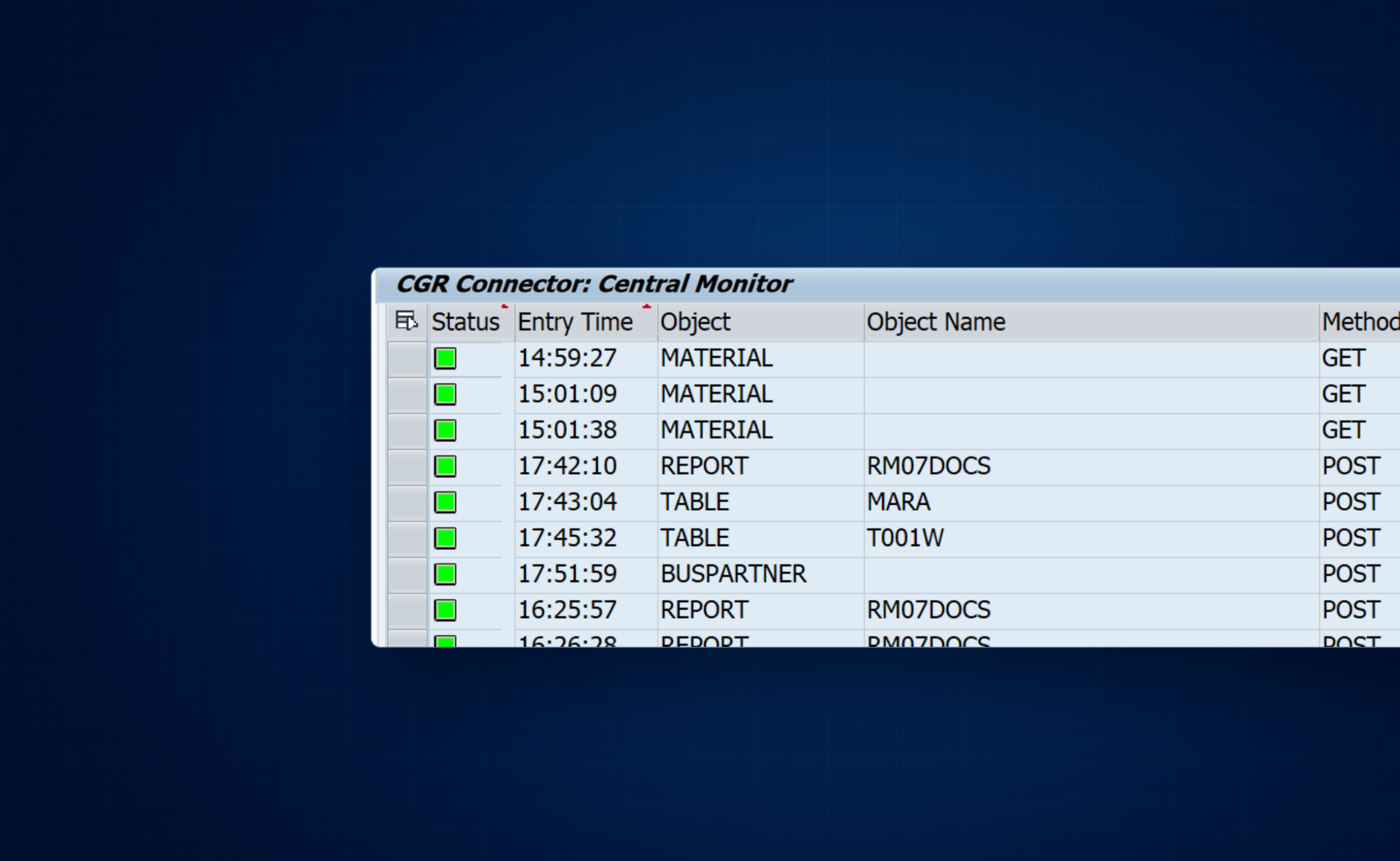
Open transaction /CGR/MONI and enter selection criteria that narrow the result list to the request or time window you need. Each result row represents one connector call.

Monitor fieldHow it helps
StatusSeparates successful calls from failed executions.
Date and timeCorrelates the SAP log with the external application’s request timestamp.
Object type and nameIdentifies whether the call targeted a table, function or report and which object was requested.
SAP userShows the technical identity used for authorization checks.
Source hostIdentifies where the HTTP request originated.
HTTP method and response reasonHelps distinguish request-shape, authorization and execution failures.

Every record is stored in backend table /CGR/API_LOG with a unique MESSAGE_ID. Capture this identifier in calling applications whenever it is available.

Inspect request and response payloads

  1. Select the request row in /CGR/MONI.
  2. Choose Display Request Payload to review the received parameters or POST body.
  3. Choose Display Response Payload to review the JSON returned to the caller.
  4. Compare the response reason and payload with the backend dump or authorization log when the call failed.
Large payloads: the monitor displays only the first 500 records when the stored payload is very large.

Schedule log cleanup

Use transaction /CGR/DELETE_LOG to run or schedule the connector log-cleanup program. Set the number of days that must remain available for operational support and audit needs, then schedule the cleanup at an appropriate interval.

  • Choose a retention period with application owners and security teams.
  • Schedule cleanup before /CGR/API_LOG grows unnecessarily.
  • Retain logs long enough to investigate delayed error reports from consuming applications.

Error handling and troubleshooting

Start with the HTTP status, then confirm authentication, the CGR whitelist, standard SAP authorization and the target object’s existence. Use the connector log to correlate the external error with backend details.

HTTP status reference

HTTP statusTypical causeWhat to check
400Required object name, report name or variant is missing.Verify the mandatory id parameter and the report variant.
401The SAP user is not authorized.Check the CGR whitelist and SAP objects such as S_TABU_DIS, S_TABU_NAM, S_RFC and S_SCOPE, as applicable.
404The requested table, function or report is not active or does not exist.Verify the exact object name in the target backend system.
500Execution failed because of a runtime error, database issue or lock.Find the request in /CGR/MONI, then review backend dumps in ST22.

Authorization failures

For an HTTP 401 or an SAP authorization error, verify each layer separately:

  1. Authentication: the SICF logon succeeds, or the OData bearer token is valid and not expired.
  2. OAuth scope: for OData, the client and SAP role authorize the generated /CGR/CONN_SRV scope through S_SCOPE.
  3. CGR whitelist: the effective SAP user is configured in /CGR/API_AUTH for the exact object or an applicable type/pattern.
  4. Standard SAP authorization: the user has applicable objects such as S_TABU_DIS, S_TABU_NAM or S_RFC.

Service activation and routing failures

Endpoint not found

Check service activation

For SICF, confirm the cgr/api nodes are active. For OData, confirm /CGR/CONN_SRV is registered for the intended alias and its ICF node is active.

Wrong backend

Check system routing

Verify the sap-system alias, the BACKEND entry in /CGR/RFC_DEST and the associated RFC destination.

Object not found

Check the target system

Confirm the table, view, report, query or function exists and is active in the backend where the request actually executes.

Execution failed

Check the ABAP runtime

For HTTP 500, review the connector response and transaction ST22 for dumps, database failures or locking errors.

Recommended diagnostic path

  1. Record the HTTP method, complete request URL, timestamp, response status and MESSAGE_ID.
  2. Locate the execution in /CGR/MONI or /CGR/API_LOG.
  3. Inspect the stored request payload to confirm the object name, variant, parameters and backend alias.
  4. Inspect the stored response payload and reason.
  5. Based on the status, check service activation, OAuth scope, CGR whitelist, SAP authorizations or ST22.
  6. Repeat the smallest possible request after correcting the configuration.

Download PDF guides

Download the CGR SAP Connector guides for offline reference, from installation and configuration to API usage and troubleshooting.

PDF · 3 pages

Product Capabilities

Compare the SICF and OData versions, supported SAP objects, and core connector capabilities.

Download Product Capabilities (PDF)
PDF · 5 pages

How to Install

Install the connector in standalone or distributed SAP landscapes and register the OData service.

Download How to Install (PDF)
PDF · 3 pages

Configuration

Set up system licenses, backend routing, and object whitelists for connector users.

Download Configuration (PDF)
PDF · 5 pages

Security and OAuth 2.0

Configure authentication, OAuth 2.0, scopes, roles, and the connector's authorization layers.

Download Security and OAuth 2.0 (PDF)
PDF · 11 pages

Calling APIs

Reference SICF and OData endpoints, parameters, request payloads, and response formats.

Download Calling APIs (PDF)
PDF · 3 pages

Monitoring and Log Retention

Find connector requests, inspect recorded payloads, and manage log retention and cleanup.

Download Monitoring and Log Retention (PDF)
PDF · 3 pages

Error Handling and Troubleshooting

Interpret HTTP errors and diagnose authorization, service activation, routing, and runtime failures.

Download Error Handling and Troubleshooting (PDF)

Documentation applies to the CGR SAP Connector for SAP ECC and SAP S/4HANA. Available features and installation artifacts may vary by release.